Go to Spungella for new posts.

> academyanimation is no longer active and serves as archives
Showing posts with label Examples. Show all posts

Friday, March 28, 2008

Mr. Blake's Art Diary - Part 1

I've found this site a while ago but it had so much good stuff on it that I procrastinated a post about it. Well enough is enough (plus it's slow at work right now), so here we go. This is just a best-of that I found interesting (goes back till 2006), ranging from animation tips and tools to just cool stuff. There is obviously much much more, so I encourage you to go through the posts yourself since I will only post animation (kinda) related posts.

(There is a lot of stuff worth mentioning, so this will be part 1. On Monday I'll post part 2.)

- First off a piece of artwork by Mr. Blake which I really like (street scene)


- Next up is "Graph Editor Redux 1.1.0". Follow the link and download it from highend3d. The download comes with a handy PDF for instructions.


- "Frenzied Fauna: From A to Z" has really funny and cute creatures by Michel Gagne. His site also displays his work on/for "Ratatouille", "The Iron Giant", etc.


- If you want to have your animation controls invisible while you work but still be able to select them, then check out "Keith Lango's trick for invisible viewport selections in maya".

- Here's a huge collections of character animation scripts by Aaron Koressel. ackNewGraphEditor sounds good (any tool that improves the graph editor is worth a look), then ackSliceCurves sounds awesome. It "inserts a key at the current time into the currently selected curves while preserving tangents". Good to have. Much more there, go check out the list.
There's tons of good stuff out there, so stay tuned.

- Check out Deter Brown's Animation Mentor Demo Reel, with some cool animation and nice renders.

- Storyboarding tool as well as many other production related tools.

- ShapeShifter is a web based animation program. Very simple but a lot of fun.


- Gesture Drawing for Animation by Walt Stanchfield. There used to be a pdf collection online, but since an official book is coming, it got pulled. Check the site for an update on when the book will be released.

- Feng Zhu Design. Go to the gallery section and check out the beautiful artwork. There are also workshop DVDs and much more.


- "Pencil" is a free Windows/Mac/Linux animation program (2D)


- "Maya Tutorial Muscle Rigging" by Fahrenheit Digital

- Veerapatra Jinanavin's Animation site - you might recognize his older work, very cool though!


- "Supercrumbly" collection of MEL scripts (auto rigging script, bookmark your curves, etc.)

- "PoseLib" lets you set up a library for your poses. (direct link)


Don't stop there though. "SeithCG" has a great post to his "Flushed-Away" Animation Process, with a clip showing initial blocking to final animation.


- "ShotView for Maya" - This is a tool by Cameron Fielding for a clean maya viewport. I think I linked to it before on this site, but it's always worth linking to it again


- "sparth - by Nicolas Bouvier" is an awesome blog with fantastic artwork


This one was done on the Nintendo DS using "colors".

>>Click here to read the rest of the post...

Monday, March 17, 2008

Stumbled onto tons of links

Every now and then I check the stats of this site and this time followed a link to someone called "Arien". He had a list of useful links on "Stumble!" and here they are:

Tutorials and Technical Information for 3D Modeling, Animation Setup, and Rendering

Tons of stuff about the trax editor, FK-IK Spine setup, Blendshapes, Footrolls, Gimble Lock, then links about Cloth, Rendereing, Texturing, etc.

Another was for abhimation.blogspot and the post "Dialogue Clips to Animate" has a good list of audio clips.

This next one is awesome. I thought I posted about it a while ago, but it's worth a repost. It's the Art Tutorial page of itchstudios.


Then there is this silhouette image from uxmatters by Kevin Cheng.


The next one cracked me because I'm so rarely sketching things out (because I SUCK big time), and then I see these elaborate renders for a bouncing ball assignment (courtesy of Kid-Mesh @ CGsociety)


Then you got this massive Maya Video Tutorial site. You have among others:
- Illustrator to Maya
- Blendshape controls
- Maya 3D Piston
- Mental Ray
- Suspension Rig
- Modeling Tutorials

etc. etc.

Another thing was an animation blinklist (?). Worth a look, you never know.

Next one is a classic site. I remember checking it out while I was a student. It's about walk cycles courtesy of Thinking Animation. Head over there for a cool example list of different walk attitudes.

Next one is another Maya tutorial list on 3d-tutorial.com. You got stuff like Animation Layers, Rigging examples, etc.

Next one is the "Things They Don't Teach in Art School #5" post @ Temple of the Seven Golden Camels
You should visit that site no matter what.


Next up is "Animation Critique". I haven't registered yet, but could be good. If you're unsure about your clip, the more eyes the better.


Then you have animationresourcecentre, which has tons of links to animation shorts. One of them being "Zoudov". Even though I wish the animation was more polished, I love the feel of it (the John Barry music helps a lot, classic).


Lastly, talino.org has a nice little tutorial section for Maya.

>>Click here to read the rest of the post...

Tuesday, March 11, 2008

Dog Walk by Neil Parkinson

As I was going through google in search of rigs for Animation Buffet, I stumbled across this dog animation by Neil Parkinson (see his website here).
This happens to showcase what I was talking about yesterday in class about toe animation, how they would fan out once they hit the ground and curl back when the foot gets off the ground. It's subtle in this clip, but still there.

>>Click here to read the rest of the post...

Thursday, February 21, 2008

Turok Animation: The Making-of

Make it a priority to head over to Cameron's "Turok Animation Workflow" post. A must read!

>>Click here to read the rest of the post...

Friday, February 15, 2008

Carlos Baena's website

Thanks to a tip and comment by David Bernal I checked out Carlos Baena's website and what a well of information, holy moly! He's updated the site and added soooo many goodies, fantastic!

Drop whatever you're doing and go through each page!

The Home page will give you general info on what he's working on and who he is.

The Animation Page is divided into:

Feature Animation Work - with quicktime clips of his work
Personal Animation Work
Misc Animation Work - his cool Watto test is on there!

There is also a fantastic Resource section:

First, Animation Material. It's the same link as I have on the right side under my resource section, so I can't say if he added stuff, but even if he hasn't, there is so much good stuff on it, you HAVE to check it out.

Then his Book Recommendations. Go start digging through those.

Then the Tips & Tricks section. There's a section about "Thought Process" and an awesome one about "Eyebrows". Again, take a moment and go through those pages. Thanks again David!

>>Click here to read the rest of the post...

Wednesday, February 13, 2008

Cameron Fielding on Flip

This is just too cool, love it! Like I said, check out Jeff's site. Not to double post but with this one I just wanted to make sure you guys are seeing the clip (and make sure to check out his blog "Flip", it's listed on my links list).

>>Click here to read the rest of the post...

Tuesday, February 12, 2008

Very useful links

Like I always say, sponge up all the information you can get. Please check out the links on the right side of the posts on this site, go through the resources and links.

One of them is Jeff Cooperman's blog. I always check it out because the info on it is great and there a lot of visual tips and critiques. Today I saw a post about TJ Phan's blog and his Spiderwick Goblins animation. That cracked me up because TJ emailed me last week and I wanted to link to his "A few good Mel's" post. Now he's up on Jeff's site. It truly is a small industry. :)
I highly recommend his site because just like this one it's updated on a daily basis, so make it a daily visit. I can't stress this enough, sponge up all the information you can. You need to find your own way of working, my method and workflow is only one of many. Figure out the best and most efficient way and most importantly, have fun with it. Maybe that's just me but I love reading up on techniques, watching other people's work, etc. it really motivates me to push myself and to get off my lazy butt.

Anyhoo, please check out:

Guest critique by Travis Howe on Jeff's site

MEL script goodies:
maya tools for y'all on Jeff's site and
a few good mel's on TJ's site

TJ's Spiderwick Animation. Like he says, "They're basically bouncing balls with teeth." Which tells you that there is a reason why everybody starts with a bouncing ball. It is the basic starting point that teaches you all the principles (animate different balls with character and tails and you got it all in there).

>>Click here to read the rest of the post...

Friday, February 8, 2008

Animation Mentor Newsletter - February 2008


If you haven't done so yet, sign up for the Animation Mentor Newsletter (free of course) @ animationmentor.com

This month you get:

Tips & Tricks by Shawn Kelly (a must read - if you're new to this, go through the Tips & Tricks Archives as well)

Video Games Triple Play
- Video Game Reel Tips
- Animating for Video Games
- Game Developers Conference

"The Park" short film by Roger Gimenez

Jason Schleifer - Mentor

Mark Behm eCritique for the 11secondclub

Animation Podcast - James Baxter

Bobby Beck's Blog

Student - Teresa Nord

>>Click here to read the rest of the post...

Saturday, November 10, 2007

Animation - Fight

Good example of holds. It would be easy to just have the character be still, but the keep alive keeps the character... alive...


>>Click here to read the rest of the post...

Tuesday, November 6, 2007

4pm - student film by Mark Oftedal - great hands!

I saw this a while ago and Cooked Art has it up now. Fantastic hand animation! The poses and timing are great.

>>Click here to read the rest of the post...

Tuesday, October 16, 2007

The Keys to Getting a Job by Pamela Kleibrink Thompson

update: this post has now been translated into Italian! You can read it at animatorspot.com

Disclaimer: I haven't seen any notification that taking notes and posting screen captures of this
lecture are forbidden. If so, please contact me first before taking legal actions. ;)


I wanted to write down the main points of the Demo Reel Siggraph video "Resumes and Demo Reels" (link to video is not valid anymore; if anybody can find the clip online, please leave a comment) by Pamela Kleibrink Thompson, because it's good stuff. Make sure that you watch the video as well.

Obviously when she mentions that you should divide your reel into sections, like character animation, modeling, logos, etc. it might not be relevant to you, if you are applying for a full time character animator job. But overall it's a great and very useful lecture.

Here's her contact information:

Pamela Kleibrink Thompson
The 911 Recruiter/Career Coach
Ask about the Career Navigator Program
www.linkedin.com/in/pamelathompson
http://www.facebook.com/PamRecruit
https://twitter.com/#!/PamRecruit
Career Coach column at http://mag.awn.com

------------------------------------

You are a product, a unique individual and you need to package yourself. The marketing tools for that are:

- Resume
- Portfolio
- Demoreel

Main objective is to get an interview.

The invisible resume and the most important marketing tool though, that starts with you entering the interview room or classroom, is your reputation. Attitude is a key factor. People within your company will move to other jobs and referrals are a big part of recruiting. You want people to remember you in a good way. A fantastic resume and reel will be useless if someone doesn't want to work with your personality.

When you start at your first job, have enthusiasm, go the extra mile, be a problem solver, don't complain, follow directions, give ideas and contribute, etc. It's all a matter of attitude.

Once you get that interview the people want to find out 3 things:
- are you willing to do the job (that's your attitude)?
- can you do the job (although that's obvious looking at the reel and resume)?

and most importantly:

- will you fit in? Are you a team player?

You need to convince them. Do your homework, research the company you are applying for, be prepared.

------------------------------------------------------

"Make it Easy for the Recruiter." - Recruiters are generally overwhelmed, they have to do a lot of sifting through resumes. But their job is to find the right person and they know their company. Don't just hand your reel to your friend at the company, but go through HR as well. They know about project openings that your friend doesn't. Better safe than sorry.

"You spend a lot of time agonizing about your stuff. Do you know how much time they spend looking over your stuff? Probably about 5 seconds." Due to high volume of resume/reel submissions, your work has to stand out, otherwise your resume ends up in the trash and not in the "to be called" stack.

Resume Checklist:

Contact Info at Top
- Phone Number > Current area code & Voice mail or answering machine
- Name
- Email address

- Large, legible type font
- Easy to read
- Not too much type
- List skills
- Highlight accomplishments (this is your time to brag)
- Single page > If multiple pages, contact info on other pages too

-
Proofread (it will land in the trash otherwise)
- Goal/objective > What you want to do (important if changing careers)

Be specific
- No "variety of 3D packages", because companies use computes that scan for certain keywords. So if a company is looking for Maya animators and the recruiter is scanning through all the resumes with that keyword and it's not on your resume, it won't pop up.
- make sure that your resume copies well (dark paper will make it hard for the type to read; don't use parchment paper, etc.)

She shows great Sample Resumes with Gray Scale Art obscuring the Contact Information, hard to read and crowded fonts.
In short:

- Test your resume - fax, copy (legible over several generations)
- Color (no orange, dark blue, purple)
- No marble/-parchment paper
- No gray scale
- Attach artwork
- Review and update every 6 months
- Update when information changes
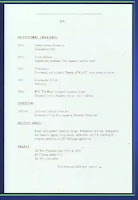
Good resumes are easy to read and have plenty of white space. Simple, clear and concise. (shows sample)
The structure would be something like this:

NAME
Telephone*fax*email address*web address
OBJECTIVE (be specific)
SKILLS
*Bullet points
EXPERIENCE (Include accomplishments)
EDUCATION

(funny story about an Amblin intern who used to walk Spielberg's dog, which is a little mutt; cracked me up because the rumor is that Shia's name is Mutt Ravenwood and he's Indy's son. So Indiana is named after his dog and now Indy's son is named after Spielberg's dog! The circle is now complete. Oohkay... anyway.)

Resume via email:

- Don't send resume as attachment (fear of viruses).
- Send resume in an email message as text.
- Don't email from work or use work email address on resume.
- Don't expect employer to visit web site to view or download resume (make it easy for them, don't give them extra work to do)

--------------------------------------------------------

Cover Letter Tips

List:
- Personal connection
- Common ground
- Referral
- Advantage

3 to 5 paragraphs long

- Cover letters are:
> A sales tool. Part of the marketing package.
>Often not read, especially if they are too long.

- Cover letters should be:
> Short and to the point.
> Specific and clear.
> Easy to read.
> Addressed to someone specific.

- Use cover letters to:
> Clarify what you are offering the company, if it isn't clear from your resume.
> Indicate career change or clarify special circumstances or skills.

- If one page resume, copy double sided with cover letter
> "See my resume on back of this cover letter."

She lists areas that need artists. Mentions Consumer Products (Packaging & Advertising) as a very steady and sought after position.

-----------------------------------------------

Demo Reel Do's

- DVD (now primary media over VHS otherwise 1/2" VHS (NTSC for U.S. Companies))
- Web sites (ask first if company will look at it)
- Check DVD before you send it (on different machines)
> PC & Mac compatible
> Autoplay [after checking with recruiters, they do NOT encourage autoplay, just have a simple menu that says "Start Reel" or something, because it's irritating to them when the reel starts automatically and they are not ready]

- ALWAYS include a resume and reel, breakdown/credit list with your reel
- Clearly label your reel and reel breakdown with your name and contact info
- Best, most recent work first (funny story about that)
- 3 minutes or less
- One shot can get you hired

Make sure you watch the video for the examples and stories (about the one shot reels for instance).

- Focus on your strengths
- Demonstrate your abilities and creative talents
- Show a variety of work
- Customize your reel to the job and company you are applying to, if possible. (you might need multiple reels)
- Include a head and tail slate with your name and contact info, especially email address.

- Divide your reel into sections: "Character Animation", "Modeling", "Logos", etc.
- Update reel and portfolio every six months
- Remove old work, even if you love it (another funny bit)

"Most times people will spend about 30secs on your reel. If they don't see something in those 30secs you're out of there."

You're going to be judged on the weakest piece in your portfolio.

Professional Presentation
- Screen shot on label or outside wrapper: memorable image of your work.
- Include the screen shots with your resume: separate sheet attached
- Package yourself
- Details matter
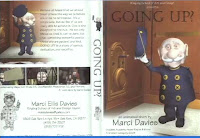
Video shows nice DVD wrapper example, matching DVD with DVD label (CONTACT INFO on wrapper, DVD itself, etc.).


- Include life drawing or other fine art work such as sculpture, painting or photography at the tail of your reel.

---------------------------------------------

The Breakdown - also called Credit List or Shot List

- Always include it with your demo reel.
- Be clear.
- A short paragraph for each shot on the reel is plenty of information
- Be precise and consise.
- For example:
> Segment 2: "Wizard of Oz" film, animated witch melting with Software A and hardware B for company C

Information to be included:
- What was your involvement with each piece? Explain exactly what you did for the shot.
- What project was it done for? > Film, game or TV?
- Where was it done? > At which company? Personal project at home?
- What tools did you use? > Hardware and software
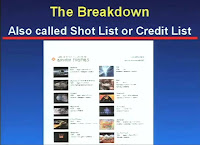
Movie shows "Breakdown List Sample". (surprised they liked that one, looks like too much work - the second one is cool though with thumbnails for each shot and a little description).


- Put slates before each shot or superimpose description on shot (subtitle) (I see subtitles more than slates, that way the reel is not too long)
- Students often work on group projects
> Student should specify what he did on each shot.
> If student did everything, say so in the breakdown.

------------------------------------------------

Demo Reel Don'ts

- Never send masters or originals.
- Don't put your best stuff last. The viewer may never get to it.
- Don't do a chronological work history.
- Don't include early tests.
- Don't include mediocre work.

Focus on the Visuals not Audio.

Kiss off loud, obnoxious music or elaborate sound.

- Color bars are not necessary nor countdowns
- Don't expect prospective employers to view samples or a resume on a web site. A lot of companies will look at it, a lot won't. Ask first what they prefer. Main rule, don't ask employer to do any extra work, make it easy for them.
- Don't send the exact same reel in 6 months. We have very good visual memories.

Companies have reel review sessions and there are dedicated people who take notes and log comments about your reel. All the notes are collected and put into a file, that file grows and there are notes about how you improve and at a certain point you are called "Hireable". So when your skill set matches their openings you will get a call.

Your Demo Reel will not be returned.

- Minimize erotica, satanic and violent material.
- Don't include live action film without animation or computer graphics
- Don't send work in progress.
- Don't ask for feedback by phone. (if you're lucky to get feedback, pay attention, don't argue, don't be defensive, take notes)
- Don't shrink wrap your reel.
- Don't email images as attachments. Fear of viruses.

Don't take it personal if no company calls back, there could be many reasons.

- Don't put tutorial exercises on your reel.
- Don't embed images in email unless you have permission. Slows down downloads.
- Don't wait until a conference to submit your reel.

At Digital Domain, they get 30 to 40 reels in a normal week. When they advertise or post a job, they get around 300 to 400 reels. At Siggraph week, they get between 3000 and 4000 reels. Think about that. It's going take them a while to go through the reels. So if you don't hear from them immediately, it means that they may be reviewing reels still. It's going to take them about 3 months to get through all the reels, that they see at Siggraph. Now some of them will do it more quickly, because some of them will just fast forward through your reel. Really quick. After all the agony you've done making sure that your reel is the greatest it ever could be, they might spend 30 seconds on it, possibly, if you're lucky. They are going to fast forward it and see if there is anything that catches their eye. That's why you need to make sure that your best stuff is up front, ..." Grab them right away. Some companies will bring back the reels from Siggraph and watch them properly, over the course of time, others will just fast forward through them in their hotel suits late at night.

Why are companies even coming to Siggraph with their big expensive booths? Why collecting all those reels? Because there might be one or two or three out there that we really want to find. So they want to hire you, they are looking for you. You just have to make it easy for them to find you.

Start sending your reel in December. Or for students right after graduation in April or May.

More Demo Reel Tips:

- Be impressive, not excessive.
- Keep it short and sweet.
- Always include breakdown.
- Always label with contact info.
- Quality matters.
- Your demo reel gives the viewer a look into your brain -- how you solve problems.

There is no magic formula. It's just hard work and persistence and networking.

----------------------------------------------

Jobs in Visual Effects:

- Modeling
- Texturing
- Lighting
- Animating
- Compositing
> Small companies want generalists
> Large companies want specialists

Shows different demo reel examples of modelers, texture artists, lighters (Lighting and Compositing combination skills are very popular and a double threat)

- Animation, Ringling Student Reel, now at EA, less than 2min long short film (most student reels lack weight). It's not just about jumping and walking or pushing something, it's about personality. - funny though because one of the first things you see are breasts (made out of wood though), the clip is funny and towards the end clearly sexual (the audience laughs), but it's not disrespectful and the response is positive, so I guess she got away with it. :)
continues with compositing, fx artist, etc.

A lot of times the sound is off during reel reviews (except during lip sync animation clips).

For Riggers, show the rigs moving, not static.

--------------------

Conclusions:

- make it easy for the recruiter, package yourself well, be flexible, be ready to take chances, take risks.
- Content is what counts
- What matters is the work
- Nobody cares how old you are or what school you attended
- What makes a reel great? If your work can be cut into the company's work seamlessly, that's great.
- Show the very best you can do
- Show off your skills
- Show you are capable of doing the work

Your most valuable marketing tool:
- The Invisible Resume
- You start building it in school
- You build it on every job
- Your reputation is most important
- Make sure it's stellar

Don't burn any bridges.

She tells a story about someone screwing up big time, getting on "the list" by just not showing up at work for his first day, because he decided to work for another company. But he didn't call the first company to tell them that he's not going to show up. Big mistake.

-----------------------------------------------

That's it, the Q&A is not on it. Lots of good stuff tough otherwise, you should print it and make a little book out of it. :)

>>Click here to read the rest of the post...

Tuesday, October 9, 2007

Blocking Stages

For some curious reason I've received numerous emails from students expressing their dissatisfaction with their clip, even going as far as stopping to work on it completely (curious because they all arrived pretty much at the same time). All of them were in the blocking to blocking+/polish stages, where the main ideas are in it, but not all the details.

If you have a clip which is very subtle, the basic blocking might look very boring to you (that happens even with action pieces btw.). Don't give up, trust your instincts. If you liked the idea at the beginning, hold on to it. It's normal that you get bored or frustrated after seeing your clip a hundred times. Work on a 2nd clip to change your ideas and to keep a fresh eye.

Sometimes the "wow" factor lies within the polish. Just make sure that the foundation, the blocking, is in place and go from there.

Justin Barrett has an interesting breakdown of his Puss in Boots clip, from acting reference to final polish. There is even a clip with 4 stages shown at the same time. Read through his breakdown here.

>>Click here to read the rest of the post...

Animation Mentor Fall 2007 Student Showcase

Alright, ready for a big piece of humble pie and a refill on motivation?

Stop whatever you're doing and watch the AM Student Showcase 07.

It's fantastic and humbling to see how high the bar is now in terms of student work.

Perfect example up front, Nathan Engelhardt's Body Mechanics clip with the cave men. It could just be a weight assignment, but there is so much that makes this clip stand out. First of course, the animation. It's very well done and funny, the emotions are clear and the character seems alive. There is also interaction with the set, as he pushes away his tools during the struggle.
The 2nd guy adds humor to the whole "exercise" and gives it a little story. Also a good incorporation of a cycle (with some extra tweaks to disguise the cycle).
The composition is clear. Even though the character is right smack in the middle of the frame, the emphasis is on the stone, which occupies most of the left screen half. He's standing in front of the sky, which makes his silhouette clear, there's nothing busy behind him.
It's not just an empty space, it's an actual location and the character is part of it. He's wearing his little loincloth. The landscape is not just flat, it's a bit uneven where he stands, there are hills and rocks in the background and stones and bones in the foreground. Nice touch how the foreground and background are out of focus, adding depth to the scene.

All of this doesn't require any technical skills (besides the animation mechanics of course). There are no crazy modeling skills necessary, this should all be doable.

The visual icing on the cake are the textures. The stone, the landscape, the exaggerate form of the clouds, beautiful. The lighting works also very well.
The rocks and the sky could be taken from an image and not be actual geometry. But the realistic stone texture makes it all work together and nothing stands out as out of place.

But that "little" extra requires skills beyond animation and basic modeling. I would always spend the extra time on animation. When you feel that the animation works and you have free time, then you can work on the extra visuals.

Either way though, this is what students do, that's the current level.

As you continue watching the reel, you start to wonder if all the students took extra texturing classes, since all the sets look very nice (even the snow on the 2nd clip). :)

Another fantastic clip is the two character interaction one by Shad Bradbury. I've always been waiting to see a clip like that (since most clips online are about one or two characters talking). This one shows a great feel for weight.
The struggle of the little guy lifting/pushing/pulling the heavy one is great, but I'm actually always watching how the heavy one moves. The way the body feels heavy and squishy is great. A bit cliche maybe but to push it further you could put those characters in a warzone or some environment which makes it clear why he's pulling his buddy. Yes, it's the desert and he wants to help/save him, but a more interesting set and maybe interaction with it would have been top notch.

There is a lot more in that reel, so please check it out, it's well worth the time.

>>Click here to read the rest of the post...

We Were Centurions

Go to wewerecenturions.com and watch the clip. I feel bad for complaining about something (I hear my own voice going: Well how about you create a finished short instead of criticizing), but here it goes. This is (to me at least) an example of too much gesture acting, less would have been a lot more. If you characters have limited facial features, there is no need to act everything out with your arms/hands to compensate for it.

>>Click here to read the rest of the post...

Tuesday, September 25, 2007

Walkcycle - Moving the body forward

I was checking online for a normal walkcycle which had the body go forward during the cycle, just to make sure that I wasn't full of crap by telling you not to do so. I learned it this way, but maybe in the meantime the approach of a cycle changed. But I couldn't find anything either in tutorials nor in video reference.
The only time I moved the body was for a more exaggerated walk, or sneak, something more rhythmic.
So I did this cycle to check it out for myself anyway and remembered something essential. When you take your character and move him/her/it from A to B, any cheats in the foot area obviusly won't work, because you will see if they stick to the ground or not (my right foot was sliding...). If you want to be really sure that your walk will work, grab your ALL_Body controller (or whatever controller moves your WHOLE character) and set keys so that your characters walks from A to B without sliding.


Here the character is moving its body forward during the cycle. Notice how there is a hiccuppy feel to it because of that.


This time the body just goes up and down, which eliminates that pop in the walk.

>>Click here to read the rest of the post...

Monday, September 24, 2007

Bouncing Ball - Reference Animation


Here's another set of bouncing balls which show mastered physics.

>>Click here to read the rest of the post...

Wednesday, September 19, 2007

Animation Portfolio Reference

[UPDATED March 10th '08]

- Check out the weight lift animation by Raphael Suter made during his Pixar Internship.

--------------------

- The February Winner of the 11secondclub competition did a really great job. Check it out!

--------------------

- These two posts show a very relaxed and smooth walkcycle. One here, and the other one here, which has great visual aids in order to see which body parts are moving.

--------------------

- Check out Cameron Fielding's "Turok" Animation. Absolutely beautiful. Great reference for more realistic animation.

--------------------

Here are portfolios I recommend studying.

First, go to Cameron Miyasaki's site. I like his site, because besides showing awesome animation, it also shows a progression from bouncing balls to character work.

So first you have bouncing balls. But it's not just physics, there is great personality in each ball and it's a neat little story.
Then you move on to bipeds. Milt is a simple rig without any mouth shapes and it's perfect for pantomime. The clip shows off great body mechanics and weight, plus a little acting.
Then you move on to a dialogue exercise. Still Milt (I don't know if Hogan was available at that time), no facial work, but it's not needed because his body performance is great. Timing and acting works very well.
Then a full on short, further showcasing Cameron's great sense of acting and pantomime. It's by now 5 years old but the animation is still superb.
He then got an internship at Pixar and there you can see the same progression, just at an even higher level.
First, Luxo Jr. You get bouncing balls and the lamp showing off cute acting. No fancy rig, no fancy facial stuff, still great animation, clear and entertaining.
Then two walkcycles with Mike Wazowski and Sulley. Walks are hard to do and force you to think about a lot of elements, body mechanics wise, and on top of that you need to give it character, which he does.
Once you master all that you should be well equipped to tackle a performance shot and Buzz's slide in and delivery still cracks me up. The timing and acting is awesome.
Unfortunately you won't get to see his feature work at Pixar, just a text description. But there is enough on his page to get your animation juices flowing.

-------------------

Another portfolio, which I showed in class already, is Guilherme Jacinto's. It's immediately visible that he's a very talented guy. Beautiful drawings and awesome animation work. My favorites being the three person dialogue piece from "Creampuff" for its great acting choices and polish and the Mr. Incredible Physical Test for the weight and poses (beautiful line of acting after he throws the bomb, right down to the fingers).
The rest of his clips are great too of course, check them out again.

Don't forget to check out all the Student Showcases from Animation Mentor. Here's a link to their Fall 2007 Edition, which has some fantastic clips in it.

I think I will add portfolio's and clips to this post as time goes by, stay tuned.

>>Click here to read the rest of the post...

Saturday, September 15, 2007

Another great example of mastered physics

To play double click on movie


The physics are there, good presentation.

>>Click here to read the rest of the post...

Great Balls of Fire!

To play double click on movie


Excellent examples of mastered physics, as well as more complicated mechanics and basic squash & stretch and overlap.

>>Click here to read the rest of the post...

Wednesday, September 12, 2007

Team Fortress 2 Animation

Here's the latest clip from Valve's "Team Fortress 2". Below is another one, which has absolutely fantastic animation in it. The last one is my favorite though. There is awesome subtle stuff in it. I love the style and really hope that they will do either small episodes or a longer story either online or on tv.


>>Click here to read the rest of the post...

Banner